This is the wiki for products made by Fractal Audio Systems, maintained by members of the community.
February 9 2026: Fractal Audio introduces the ICONS plugin!
Difference between revisions of "ICONS plugin"
| Line 48: | Line 48: | ||
ICONS uses [https://www.ilok.com/#!home iLok] protection for authorization. A hardware dongle is not required. | ICONS uses [https://www.ilok.com/#!home iLok] protection for authorization. A hardware dongle is not required. | ||
| − | |||
| − | |||
| − | |||
| − | |||
| − | |||
| − | |||
| − | |||
| − | |||
| − | |||
=ICONS Fullerton= | =ICONS Fullerton= | ||
Revision as of 00:53, 10 February 2026
ICONS is a new Fractal Audio product. Information will be added as it becomes available
Contents
About ICONS
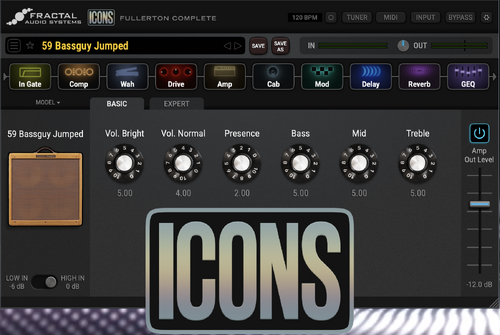
ICONS is Fractal Audio's plugin series for DAW and desktop, providing amp modeling, cabs and effects.
FRACTAL AUDIO QUOTES
[1] ICONS brings Fractal Audio’s industry-leading amp modeling to the world of plugins—and to your desktop as a standalone application.
Built on the same algorithms used in the award-winning Axe-Fx, it delivers the unmistakable tone and feel that Fractal Audio is known for—now re-imagined for modern recording and computer-based workflows.
ICONS is not a software version of an Axe-Fx. It’s streamlined to be fast, intuitive, and inspiring. Whether you’re tracking in a studio, at home, or just having fun, it focuses on what matters most: exceptional sound quality, and a creative flow that stays out of your way.
ICONS is also a series. New releases will add additional amp families with new cabs and effects, and more—allowing the platform to evolve over time—plus the improvements and enhancements you would expect from Fractal Audio.
In short, ICONS delivers the Fractal Audio amp modeling experience in a format for the new ways you want to work, create, and play.
[2] This is our "pseudo-skeuomorphic" approach that we are using for new products. There are hints of skeuomorphism but not fully skeuomorphic. Your brain sees enough visual cues to understand the lineage of the amp but without the clutter of a full skeuomorphic implementation.
[3] The modeling is a direct port from the hardware code-base.
[4] More plugins are on the roadmap.
ICONS is sold exclusively through Fractal Audio's online shop
System requirements
The Owners Manual lists the system requirements for Windows and MacOS. On a Windows computer, always use ASIO drivers.
ICONS uses iLok protection for authorization. A hardware dongle is not required.
ICONS Fullerton
The Fullerton series provides component-based models of American-style Fender amplifiers. "Fullerton" refers to the original location of the Fender factory.
The models are available in 4 separate volumes, or as a complete package.
Noite that ICONS is not an Axe-Fx in software! The modeling is ported from the hardware code-base, but there a limited selection of cabs, effects and available parameters.
For specific information about the modeled amps, cabs and effects, consult Fractal Audio’s Owners Manuals and this wiki.
- Amps and Cabs
- The Complete volume provides 36 amp models (at the time of writing), including: Deluxe, Bassman, Twin, Princeton, Super, Vibroverb, Champ and more, covering various periods in time.
- ICONS supports
DynaCab HD
, providinghigher spatial density for smoother and more accurate mic positioning
. Which means longer and more IRs under the hood.


Additional effects in ICONS Fullerton Complete:
- Compressors
- Analog, Classic VCA, Dynami-Comp, JFET Pedal
- Wah
- Cry Babe
- Drives
- BB Pre, Bosom Boost, Box o’ Crunch, DS1 Distortion, Face Fuzz, FAS Boost, Klone Chiron, Octave Distortion, Nobelium OVD-1, PI Fuzz, T808 OD, Tube Drive 4-Knob, Zen Master
- Graphic equalizer
- 5-band, 7-band, 8-band, and 10-band
- Modulation
- Chorus — Digital Stereo, Dimension, Japan CE-2, BBF-2
- Flanger — Deluxe Mystery, Digital Stereo
- Phaser — Classic Vibe, Script 90, Treadle Phaser
- Tremolo — Bias, Optical 1, Optical 2, Harmonic
- Delay
- Digital Mono, Digital Stereo, Analog Mono, Analog Stereo
- Reverb
- Multiple authentic Spring reverbs plus Room and Hall options
- Other
- Tuner and noise gate
Third-party audio interfaces
ICONS needs an audio interface to allow signal from the instrument to enter the computer, and if necessary, to monitor the audio output. This can be a Fractal Audio device that supports USB Audio (Axe-Fx, FM3, FM9, AM4, VP4), or a 3rd party product.
The following sections discuss third-party audio interfaces and provide tips to optimize the interaction with ICONS. Over time information will be added to this section.
