This is the wiki for products made by Fractal Audio Systems. Maintained by members of the community.
Difference between revisions of "AM4 amp modeler"
(Created page with "__TOC__ 400px 400px =References= * [https://www.fractalaudio.com/am4 Product page] * [https://www.fractalaudio.com/am4-downloads/ Do...") |
|||
| (392 intermediate revisions by 2 users not shown) | |||
| Line 1: | Line 1: | ||
__TOC__ | __TOC__ | ||
| − | [[image:AM4.png|400px]] [[image:AM4-rear.png|400px]] | + | [[image:AM4.png|400px]] |
| + | |||
| + | [[image:AM4-rear.png|400px]] | ||
| + | |||
=References= | =References= | ||
| + | |||
| + | Read the excellent owners manual first! | ||
* [https://www.fractalaudio.com/am4 Product page] | * [https://www.fractalaudio.com/am4 Product page] | ||
* [https://www.fractalaudio.com/am4-downloads/ Downloads] | * [https://www.fractalaudio.com/am4-downloads/ Downloads] | ||
* [https://forum.fractalaudio.com/forums/am4-discussion.164/ User forum] | * [https://forum.fractalaudio.com/forums/am4-discussion.164/ User forum] | ||
| + | * [https://forum.fractalaudio.com/threads/🔥introducing-the-new-am4-amp-modeler.216932/ Introduction forum thread] | ||
* [http://wiki.fractalaudio.com/wiki/index.php?title=Category:AM4 Wiki pages] | * [http://wiki.fractalaudio.com/wiki/index.php?title=Category:AM4 Wiki pages] | ||
| Line 13: | Line 19: | ||
* [https://www.fractalaudio.com/downloads/manuals/AM4/AM4-Quick-Start.pdf Quick Start Guide] | * [https://www.fractalaudio.com/downloads/manuals/AM4/AM4-Quick-Start.pdf Quick Start Guide] | ||
| − | = | + | =Pictures= |
| − | + | Go to the “[https://forum.fractalaudio.com/forums/am4-discussion.164/ AM4 forum section]” to see AM4 rig pictures. | |
| − | = | + | =Comparing AM4, VP4 and FM3= |
| − | + | Fractal Audio: [https://forum.fractalaudio.com/threads/differences-between-am4-and-vp4.216961/#post-2729434] | |
| − | |||
| − | |||
| − | |||
| − | [https:// | ||
| − | |||
| − | |||
| − | <blockquote> | + | <blockquote><b>AM4 vs VP4:</b> |
| − | |||
| − | |||
| − | </ | ||
| − | + | AM4 and VP4 both deliver Fractal Audio’s industry-leading sound quality, world-class effects, and rock-solid reliability. They're the same size and form factor and use streamlined UI designs that are intended to be as easy to use as real pedals. The two products share the same core technologies used across the Fractal Audio product family. They both also offer "gig mode" footswitch operation, gapless switching, USB audio, MIDI, professional connectivity including Auto-Z analog in and SPDIF I/O, plus optional "expert" editing—on the device or with companion software. The difference is largely down to features around intended use: | |
| − | |||
| − | |||
| − | |||
| − | < | + | The <b>AM4</b> delivers top-tier amp tone and effects. We say it is "perfect for a pedalboard" but it is also an ideal standalone for a desktop or "fly rig". It includes the full AM4 Amp block with integrated DynaCab™ speaker simulation, UltraRes™ user cabs, plus a selection of stompbox and studio effects. It has balanced line level outputs, a top panel level knob, a headphones output, and a stereo analog insert for using 3rd part "post" FX without the need for a separate DI box. |
| − | |||
| − | |||
| − | |||
| − | < | + | The <b>VP4</b> delivers Fractal Audio effects for use with any amp or modeler. It does NOT perform amp modeling but it does have multiple instances of almost every effect block from the Axe-Fx III including the new IR Player. It has unbalanced outs and is unity-gain by design so no top panel level knob or headphones jack. It has a mono 4CM mode for running pre and post effects at the same time. The VP4 works extremely well as a sidekick to AM4 (AM4+VP4 = "MVP-8"). |
| − | |||
| − | |||
| − | + | <b>AM4 vs FM3:</b> | |
| − | |||
| − | + | FM3 and AM4 both deliver Fractal Audio’s industry-leading amp modeling, world-class effects, and pro-grade sound quality. | |
| − | + | They’re both based on the Axe-Fx III, with rock-solid reliability on stage or in the studio. Both include gapless switching, precision tuning, USB audio, MIDI, flexible I/O, and deep editing options—whether on the device or with companion software. No matter which you choose, you’re getting Fractal Audio quality tone and performance. | |
| − | + | The main differences are simplicity, size, and price. The AM4 is designed to be lean and mean: easy to use, small, and our best priced modeler ever. The FM3 is more of a “little brother” in the Axe-Fx family in terms of flexibility and features. It's bigger than the AM4. | |
| − | |||
| − | The | ||
| − | |||
| − | |||
| − | |||
| − | |||
| − | |||
| − | The | ||
| − | |||
| − | |||
| − | + | The <b>AM4</b> delivers top-tier amp tone and effects in a small, light, streamlined package. It has fixed four-block architecture, a shorter list of block types, simplified routing and footswitch options, and an interface designed to feel very much like amps and stompboxes. It’s ideal for pedalboards or anyone who wants great tone with minimal setup. The AM4 also includes S/PDIF in and out, a dedicated USB-MIDI port that appears in a DAW, and an analog insert for post effects—allowing you to use the onboard balanced outputs without needing a DI box. It has 104 preset slots with four scenes each. | |
| − | </ | + | The <b>FM3</b> is slightly larger and heavier but also more full-featured. It offers a flexible grid-based preset system with more block types including a looper, plus deeper routing options, and highly customizable footswitches including FC controller support—essentially a downsized “mini Axe-Fx” on the floor. It includes S/PDIF out and an extra pair of stereo ins and outs that can be used creatively for send/return, split routing, or auxiliary processing. It's your big rig in a small box, with 512 presets and eight scenes per preset. The FM3 can share presets with Axe-Fx, FM9, and FM3 within its own limits. |
</blockquote> | </blockquote> | ||
| − | = | + | =Specifications= |
| − | + | ==Design and development== | |
| − | |||
| − | [ | + | The AM4 has the same <q>audiophile specs</q> as the Axe-Fx III. [https://forum.fractalaudio.com/threads/am4-questions-from-happy-axe-fx-iii-owner.216991/#post-2730145] |
<blockquote> | <blockquote> | ||
| Line 80: | Line 57: | ||
<HR> | <HR> | ||
<blockquote> | <blockquote> | ||
| − | [https://forum.fractalaudio.com/threads/ | + | [https://forum.fractalaudio.com/threads/am4-switches-and-push-buttons.217466/#post-2737212] |
| − | + | The AM4 is a product that prioritizes sound quality over bells and whistles. It is stripped-down and simple to use. | |
| + | </blockquote> | ||
| + | |||
| + | <blockquote> | ||
| + | [https://forum.fractalaudio.com/threads/shouldnt-there-be-a-pitch-block.217555/page-2#post-2739484] | ||
| + | In a perfect world the DSP in the AM4 would run at 1 THz and consume 1 mW of power. Unfortunately the world is far from perfect and compromises must be made. I still think it's amazing we packed all that we did into it with a 13W power envelope. The power design for the product was one of the biggest challenges. | ||
</blockquote> | </blockquote> | ||
<blockquote> | <blockquote> | ||
| − | [https://forum.fractalaudio.com/threads/ | + | [https://forum.fractalaudio.com/threads/what-are-the-converters-in-the-am-4.218272/page-2#post-2748161] |
| − | + | The converters aren't the identical converters used in the Axe-Fx III but they're from the same family. The Axe-Fx III uses 8-channel converters while the AM4 is only two channels. The specs are pretty much the same. | |
| − | The | + | The analog components in the AM4 are also very high quality. It uses premium Burr-Brown and Analog Devices op-amps. No crappy CMOS stuff, it's all either Bi-FET or Bipolar. Film caps in critical locations. |
| − | + | ||
</blockquote> | </blockquote> | ||
</blockquote> | </blockquote> | ||
| − | =Processing and memory= | + | ==Processing and memory== |
| + | |||
| + | A meter in the upper right shows the current CPU usage. To ensure smooth performance, a limit of about 85% is enforced, leaving required processing power in reserve. If this limit is exceeded, a warning will be shown: “CPU LIMIT: Bypassed" and the AM4 will bypass all processing. | ||
| + | |||
| + | The CPU metering is dynamic: the amp modeling running on the core is actively metered during play. The manual recommends aiming for max 80% when not playing and then playing the preset to ensure stable performance. | ||
<blockquote> | <blockquote> | ||
| Line 98: | Line 84: | ||
<HR> | <HR> | ||
<blockquote> | <blockquote> | ||
| − | [https://thegearforum.com/threads/fractal-audio-systems- | + | [https://thegearforum.com/threads/fractal-audio-systems-am4-amp-modeler.10317/page-11#post-433876] |
| − | The | + | The processor in the AM4 is faster than the VP4. |
</blockquote> | </blockquote> | ||
<blockquote> | <blockquote> | ||
| − | [https:// | + | [https://forum.fractalaudio.com/threads/am4-questions-from-happy-axe-fx-iii-owner.216991/#post-2730145] |
| − | + | AM4 uses the same family of CPU as in the Axe-Fx III. It is a 1 GHz processor with an ARM A15 CPU and a C66x DSP. Therefore it has half the power of a standard Axe-Fx III. | |
</blockquote> | </blockquote> | ||
<blockquote> | <blockquote> | ||
| − | [https://thegearforum.com/threads/fractal-audio-systems- | + | [https://thegearforum.com/threads/fractal-audio-systems-am4-amp-modeler.10317/page-82#post-442250] |
| − | + | SHARCs are cheaper. We haven't had any issues with sourcing Keystones. The TI DSPs require a little more ancillary hardware (PMICs, reset logic, etc.). | |
| + | |||
| + | However, the Keystones outperform the SHARCs in several key areas: memory bandwidth, on-board LCD interface with video frame buffer, more robust USB implementation, superior per-clock DSP performance. | ||
| − | + | The SHARCs, however, benefit from on-board FIR and IIR accelerators. The FIR accelerator is particularly beneficial because you can process IRs with it and offload the DSP. | |
| + | </blockquote> | ||
</blockquote> | </blockquote> | ||
| − | + | More information is available, including [https://thegearforum.com/threads/fractal-audio-systems-am4-amp-modeler.10317/page-69#post-439319 pictures of the inside of the AM4 and specifications of processors and memory]. | |
| − | [https:// | ||
| − | |||
| − | |||
| − | + | ==Latency== | |
| − | |||
<blockquote> | <blockquote> | ||
'''FRACTAL AUDIO QUOTES''' | '''FRACTAL AUDIO QUOTES''' | ||
<hr> | <hr> | ||
| − | |||
<blockquote> | <blockquote> | ||
| − | [https:// | + | [https://thegearforum.com/threads/fractal-audio-systems-am4-amp-modeler.10317/page-82#post-442247] |
| − | The latency of the | + | The actual latency of the AM4 is: |
| + | |||
| + | No blocks: 1.33 ms | ||
| + | |||
| + | Amp only: 2 ms | ||
| + | |||
| + | Amp + Cab: 2 ms | ||
| + | |||
| + | Drive + Amp + Cab: 2.67 ms | ||
| + | |||
| + | The cab processing adds no latency. Any extra measured latency is due to the IRs themselves. IR's are inherently band-limited and therefore have "latency" between the IR beginning and the peak in the response. A real speaker cab has "latency" if your method of measurement is looking for the peak in the response (which is technically an incorrect method). | ||
| + | |||
| + | We could reduce the latency by using minimum-phase resampling (the Axe-Fx offers this as an option). Many products are minimum-phase resampling by default. However, minimum-phase resampling causes phase distortion which I personally find more objectionable than an extra ms or so of latency. | ||
| + | |||
| + | Regardless, an average latency of 2 ms is extremely low. | ||
</blockquote> | </blockquote> | ||
| + | |||
| + | <blockquote> | ||
| + | [https://thegearforum.com/threads/fractal-audio-systems-am4-amp-modeler.10317/page-82#post-442274] | ||
| + | Latency is a trade-off. We could reduce the latency on an AM4 to under 1.5 ms by using minimum-phase resampling but that adds phase distortion. | ||
</blockquote> | </blockquote> | ||
| + | </blockquote> | ||
| + | |||
| + | ==Screen== | ||
| + | |||
| + | The display is a 480 x 272 high-contrast color LCD. | ||
| − | + | The AM4 does not have a touchscreen. | |
| − | = | + | ==Dimensions and weight== |
| − | + | ; Weight : 3 lbs 9 oz (1.63 kg) | |
| + | ; Dimensions : 10.00" x 6.31" (254mm x 160.3mm) | ||
| − | + | [[image:AM4-dimensions.png|500px]] | |
| − | = | + | ==Mounting== |
<blockquote> | <blockquote> | ||
| Line 146: | Line 154: | ||
<hr> | <hr> | ||
<blockquote> | <blockquote> | ||
| − | + | [https://forum.fractalaudio.com/threads/vp4-faq.208790/#post-2612905] | |
| − | [https://forum.fractalaudio.com/threads/ | + | If you remove the feet, keep the screws out. |
| − | + | </blockquote> | |
| + | </blockquote> | ||
| − | + | ==Power and heat== | |
| − | + | The power connector is a 2.1mm barrel connector, with a negative center. The power-supply (9V DC, 1.5A) is included. | |
| − | + | ||
| − | + | Do NOT use an AC supply. It WILL damage the unit. | |
| − | |||
| − | The | + | The AM4 has a power button. |
| − | The unit | + | The unit boots in a few seconds and the unit can be used immediately. In the background all DynaCabs be pre-loaded. According to the manual, this may cause brief slowdowns during that process. This is normal and ends once all cabs have finished loading after 2 minutes or so, depending on the CPU load of the current preset. |
| − | + | Turning on a Windows computer with the AM4 connected and powered, may cause a USB connection failure. Prevent this by turning on the AM4 after starting your PC. This will be addressed in a future update, according to Fractal Audio. | |
<blockquote> | <blockquote> | ||
'''FRACTAL AUDIO QUOTES''' | '''FRACTAL AUDIO QUOTES''' | ||
| − | < | + | <hr> |
<blockquote> | <blockquote> | ||
| − | [https://forum.fractalaudio.com/threads/ | + | [https://forum.fractalaudio.com/threads/🔥introducing-the-new-am4-amp-modeler.216932/post-2729691] |
| − | The | + | The AM4 is spec'd at 1.5A. It uses slightly more power than a VP4 due to the higher clock speed. Most units will consume less than 1.3A but due to unit-to-unit variation we cannot guarantee that. |
</blockquote> | </blockquote> | ||
<blockquote> | <blockquote> | ||
| − | [https://forum.fractalaudio.com/threads/ | + | [https://forum.fractalaudio.com/threads/point-of-am4.216949/page-5#post-2729942] |
| − | + | Like our other products, the AM4 has a high-voltage analog path. The analog path runs off 24V (linearly regulated from 30V). This is done to ensure ample headroom, low noise and plenty of output signal. It costs a bit more and uses a bit more power but our mantra is always quality first. | |
</blockquote> | </blockquote> | ||
<blockquote> | <blockquote> | ||
| − | [https://forum.fractalaudio.com/threads/ | + | [https://forum.fractalaudio.com/threads/loading-cabs-message-for-2m25s-following-bootup-is-this-normal.217161/post-2732917] |
| − | + | The time it takes to load the Dyna-Cabs is directly related to the amount of CPU the current preset is utilizing. However, loading the current preset at boot time takes only a few seconds. | |
</blockquote> | </blockquote> | ||
| + | |||
| + | <blockquote> | ||
| + | [https://forum.fractalaudio.com/threads/am4-gets-pretty-toasty-after-running-for-awhile-is-this-expected.217944/#post-2743886] | ||
| + | The AM4 chassis is aluminum. It conducts heat very well. It is DESIGNED to transfer heat from the internal electronics and will therefore get warm during operation. | ||
</blockquote> | </blockquote> | ||
| − | + | <blockquote> | |
| + | [https://forum.fractalaudio.com/threads/bug-usb-is-not-getting-recognized-at-start.218667/#post-2753121] | ||
| + | This is a known issue. Turn the AM4 on after starting your PC. This will be addressed in a future update. | ||
| + | </blockquote> | ||
| + | </blockquote> | ||
| − | + | =Analog I/O= | |
| − | |||
| − | |||
| − | |||
| − | |||
| − | |||
| − | |||
| − | |||
| − | |||
| − | |||
| − | + | [[image:AM4-signal.png|700px]] | |
==Input== | ==Input== | ||
| − | Mono | + | Mono instrument input, single 1/4" TS jack, max +20dBu (instrument level). |
| − | |||
| − | |||
| − | + | Input impedance is variable and is adjustable per preset. | |
| − | The | + | The Input pad in SETUP is adjustable, with auto correction. The manual states that the AM4 is pre-configured for a typical guitar with hot pickups. If input clipping occurs, an ”IN CLIP“ warning is displayed and the Input Pad setting is temporarily increased. |
<blockquote> | <blockquote> | ||
| Line 211: | Line 216: | ||
<HR> | <HR> | ||
<blockquote> | <blockquote> | ||
| − | If the input of the | + | If the input of the AM4 clips persistently, the unit will automatically increase the Input Pad setting. When this occurs, the word “Auto” will appear next to the Input Pad value, for example: “12 dB (Auto)”, indicating that the pad was automatically increased to 12 dB. When you reboot the AM4, the automatic setting is cleared, and the last manually selected value is restored. If you want to make the automatic pad setting permanent, just turn the Input Pad knob one “click” to clear “Auto”. |
| − | setting. When this occurs, the word “Auto” will appear next to the Input Pad value, for example: “12 dB (Auto)” indicating that | ||
| − | the pad was automatically increased to 12 dB. When you reboot the | ||
| − | selected value is restored. If you want to make the automatic pad setting permanent, just turn the Input Pad knob one “click” to | ||
| − | clear “Auto” | ||
| − | |||
| − | |||
| − | |||
</blockquote> | </blockquote> | ||
</blockquote> | </blockquote> | ||
| − | + | Like the VP4, the input range of the AM4 is the same as an 18V pedal. [https://forum.fractalaudio.com/threads/input-clipping-at-18db-concern.215368/#post-2706349] | |
| − | + | ||
| − | + | ==Output== | |
| − | |||
| − | [https://forum.fractalaudio.com/threads/ | ||
| − | |||
| − | |||
| − | + | 1/4" TS, L/R (mono/stereo), max +16dBu, 1 KOhm. Outputs: balanced, +4 line level, no Humbuster. | |
| − | |||
| − | |||
| − | |||
| − | |||
| − | + | The output can be switched between mono and stereo in SETUP. | |
| − | + | The AM4 has a SPLIT output option, which sends the signal with cab modeling to Left (for FOH), and a "no cabinet" signal to Right. Each output operates in summed mono. | |
| − | + | The outputs are protected against phantom power from the mixer. [https://forum.fractalaudio.com/threads/protection-from-phantom-power.216968/#post-2729588] | |
<blockquote> | <blockquote> | ||
| Line 246: | Line 236: | ||
<HR> | <HR> | ||
<blockquote> | <blockquote> | ||
| − | [https://forum.fractalaudio.com/threads/ | + | [https://forum.fractalaudio.com/threads/output-question.216993/post-2730137] |
| − | + | The 1/4" jacks are balanced TRS. If you need XLR you can use an adapter. | |
</blockquote> | </blockquote> | ||
<blockquote> | <blockquote> | ||
| − | [https://forum.fractalaudio.com/threads/ | + | [https://forum.fractalaudio.com/threads/🔥introducing-the-new-am4-amp-modeler.216932/page-37#post-2731524] |
| − | + | +4 | |
</blockquote> | </blockquote> | ||
</blockquote> | </blockquote> | ||
| − | + | ==No 4CM== | |
| − | |||
| − | ==4CM== | ||
| − | |||
| − | |||
| − | + | [[Audio_in_and_out#Four_Cable_Method_.284CM.29|4CM (Four Cable Method)]] is NOT supported. | |
| − | + | ==Analog insert== | |
| − | + | The AM4 does not provide an effects loop. But it has a fixed insert point between the internal effects and the balanced outputs. Use these to connect outboard gear while preserving the clean, low-noise performance of the balanced outputs for FOH without needing a direct box. The insert is fixed in hardware and cannot be repositioned or switched on/off. | |
| − | + | It applies only to the main outs and is not heard on USB or SPDIF. | |
| − | + | For mono, use a standard patch cable. For stereo, use a TRS-to-dual-mono insert cable (tip = left, ring = right). | |
| − | + | * Insert Send: 1/4" jack TRS (tip=Left, ring=Right), 1 KOhm, 16dBu | |
| + | * Insert Return: 1/4" jack TRS (tip=Left, ring=Right), 1 MOhm | ||
| − | + | When recording with the VP4 (or another device) in the inserts of the AM4, choose the VP4 in the DAW as the input device to capture the audio from both devices. | |
<blockquote> | <blockquote> | ||
| Line 280: | Line 267: | ||
<HR> | <HR> | ||
<blockquote> | <blockquote> | ||
| − | [https://forum.fractalaudio.com/threads/new- | + | [https://forum.fractalaudio.com/threads/🔥introducing-the-new-am4-amp-modeler.216932/page-10#post-2728918] |
| − | + | The idea is you put your pre effects before the unit and your post effects (should you need any) in the insert. The outputs of the AM4 are balanced and designed to be sent directly to FOH and/or monitors. If you just put your post effects after the unit you would then need a DI to go to FOH. | |
| − | |||
| − | |||
| − | |||
</blockquote> | </blockquote> | ||
<blockquote> | <blockquote> | ||
| − | [https://thegearforum.com/threads/fractal-audio-systems- | + | [https://thegearforum.com/threads/fractal-audio-systems-am4-amp-modeler.10317/page-19#post-434112] |
| − | + | A freely positionable loop would require another stereo A/D and D/A would would increase power consumption, latency when the loop is active, noise, etc. Its purpose is simply to get your post effects before the DI. A typical pedal board might be something like: Wah -> Fabled Unicorn Devices (FUD) Dry Hump III Overdrive -> AM4 -> Lunar Electronics Space Echo Plus. The Space Echo Plus is your typical pedal with unbalanced I/O. You put in the insert loop on the AM-4 and the outputs of the AM-4 are balanced for FOH/Monitors. | |
| + | |||
| + | </blockquote> | ||
</blockquote> | </blockquote> | ||
| + | |||
| + | ==No analog bypass== | ||
| + | |||
| + | The AM4 currently does not provide an analog bypass mode, like the VP4 has. | ||
<blockquote> | <blockquote> | ||
| − | + | '''FRACTAL AUDIO QUOTES''' | |
| − | + | <HR> | |
| − | < | ||
| − | |||
<blockquote> | <blockquote> | ||
| − | [https://forum.fractalaudio.com/threads/ | + | [https://forum.fractalaudio.com/threads/bypass-and-signal-specs-for-am4.216969/#post-2729675] |
| − | + | The AM4 has an analog bypass but it's currently not implemented. I can't guarantee that it's something we will implement but the capability is there. | |
</blockquote> | </blockquote> | ||
| − | |||
| − | |||
| − | |||
| − | |||
</blockquote> | </blockquote> | ||
| − | + | ==Headphones== | |
| − | |||
| − | |||
| − | |||
| − | + | The AM4 has a 3.5mm stereo headphones port. | |
| − | + | Impedance is 35Ω. Recommended headphone impedance is less than 600Ω. | |
| − | + | <blockquote> | |
| + | '''FRACTAL AUDIO QUOTES''' | ||
| + | <HR> | ||
| + | <blockquote> | ||
| + | [https://forum.fractalaudio.com/threads/headphone-volume-drops-when-connecting-output-cables.217947/#post-2743884] | ||
| + | The headphone amp taps off the output driver (so that the phones are after the insert). There are protection resistors on the output driver which means the output driver doesn't have zero impedance. If you plug into something with a low input impedance (less than 100K) then you will get a slight drop at the headphones. Turn up the volume knob to compensate. | ||
| + | </blockquote> | ||
| + | </blockquote> | ||
| − | + | =Digital I/O= | |
| − | + | [[image:AM4-signal.png|700px]] | |
==Converters== | ==Converters== | ||
| Line 334: | Line 322: | ||
MIDI-over-USB is supported. | MIDI-over-USB is supported. | ||
| − | USB Audio 2.0 provides 4 channels ( | + | USB Audio 2.0 provides 4 channels (4x4) at 48kHz. |
* OUT channels 1+2: processed output | * OUT channels 1+2: processed output | ||
| Line 341: | Line 329: | ||
* IN channels 3+4 : process incoming USB Audio and send to outputs | * IN channels 3+4 : process incoming USB Audio and send to outputs | ||
| − | Windows computers require a software driver which is available on the [https://www.fractalaudio.com/ | + | [[image:AM4-USB.png|500px]] |
| + | |||
| + | [[image:AM4-signal.png|700px]] | ||
| + | |||
| + | Windows computers require a software driver which is available on the [https://www.fractalaudio.com/am4-downloads/ AM4 Downloads] page. | ||
| + | |||
| + | For USB Audio latency measurements, see under Latency above. | ||
See [[USB]] for more information. | See [[USB]] for more information. | ||
| + | |||
| + | Note that an USB connection can create a a ground loop, resulting in noise or hum. To prevent this: | ||
| + | * Switch a laptop between AC power and battery power. | ||
| + | * Use balanced cables. | ||
| + | * Insert a USB ground loop eliminator (Type-C > Type-C) between AM4 and computer. | ||
| + | * Try an audio isolation transformer between AM4 and device. | ||
==SPDIF== | ==SPDIF== | ||
| − | SPDIF can be used to digitally connect the | + | SPDIF can be used to digitally connect the AM4 to an VP4, FM3, FM9 or Axe-Fx, through RCA connectors, at 48kHz fixed sample rate. |
A digital connection avoids the necessary A/D and D/A conversion and inherent latency that comes with analog-to-digital connections. | A digital connection avoids the necessary A/D and D/A conversion and inherent latency that comes with analog-to-digital connections. | ||
| − | + | IMPORTANT: When using the VP4 and AM4 together through SPDIF, in whatever order, make sure to crank the SPDIF In Level on the receiving device, to prevent loss of signal level and possibly gain. Also select SPDIF as input source on the 2nd device. And if the AM4 goes first, crank its hardware LEVEL knob. | |
| + | |||
| + | Read <q>[[Digital I/O and recording]]</q> for more information. | ||
| − | + | =Firmware= | |
| + | |||
| + | The firmware is upgradeable, allowing adding new features and bug fixes. | ||
| + | |||
| + | You can download the latest official release from the [https://www.fractalaudio.com/am4-downloads/ AM4 downloads] page. | ||
| + | |||
| + | Public beta releases are often released on the user forum. | ||
| + | |||
| + | =Control= | ||
| + | |||
| + | ==User interface== | ||
| + | |||
| + | Compared to Fractal's modelers, the AM4 UI is simplified and streamlined, like the VP4. | ||
| + | |||
| + | Press <span class="button">HOME</span>+<span class="button">SAVE</span> together to enter the “Mode Select” menu which allows you to select between Preset, Scene, Effects, Amp and Tuner/Tempo. The mode determines what's displayed on the LCD, how the Select knob operates and what the switches do. | ||
| + | |||
| + | The factory default's “Gig Mode” configuration makes it easy to select presets, scenes, effects, channels, tuner and tap tempo. The startup mode can be set in Setup. | ||
| + | |||
| + | Press <span class="button">ENTER</span>+<span class="button">EXIT</span> together to enter Setup. | ||
| + | |||
| + | To edit parameters on the hardware, turn <span class="button">SELECT</span> in Effect mode to highlight a block, press <span class="button">ENTER</span> to edit the block, turn the corresponding <span class="button">A-D</span> knob to adjust the value, <span class="button">PAGE LEFT</span> or <span class="button">PAGE RIGHT</span> to get to other pages. | ||
| + | |||
| + | When editing parameters on the hardware, press <span class="button">PAGE LEFT</span>+<span class="button">PAGE RIGHT</span> together to enter “Expert Edit” mode. Expert Edit includes advanced parameters. Press <span class="button">EXIT</span> to quit Expert Edit. | ||
| + | |||
| + | On the home page in FX Mode, select the desired block, hold the <span class="button">ENTER</span> button, and turn <span class="button">SELECT</span> to move. | ||
| + | |||
| + | Similar to the VP4: | ||
<blockquote> | <blockquote> | ||
| Line 359: | Line 387: | ||
<HR> | <HR> | ||
<blockquote> | <blockquote> | ||
| − | [https://thegearforum.com/threads/fractal-audio-systems-mystery-product-speculation.6102/page- | + | [https://thegearforum.com/threads/fractal-audio-systems-mystery-product-speculation.6102/page-251#post-270365] |
| − | + | Behind the scenes it's the architecture from the Axe-Fx III. There's still a grid and scenes and channels, etc. It's just that it's mostly hidden from the user and simplified. | |
| − | + | </blockquote> | |
| + | </blockquote> | ||
| + | |||
| + | Tip: If you don't need scene names, use the available space to indicate the specific effect types instead. Insert spaces to visually align them. | ||
| + | |||
| + | [[image:VP4Names.png|link=|300px]] | ||
| − | + | ==Levels== | |
| − | The | + | The AM4 has two stages that affect the overall volume. |
| − | + | ; Internal levels | |
| − | + | : These operate within presets and include: Input Level, Amp Level, Scene Levels, Preset Level. | |
| − | |||
<blockquote> | <blockquote> | ||
| − | + | '''FRACTAL AUDIO QUOTES''' | |
| − | + | <HR> | |
| − | < | ||
| − | |||
<blockquote> | <blockquote> | ||
| − | [https://forum.fractalaudio.com/threads/ | + | [https://forum.fractalaudio.com/threads/understanding-level-knob-amp-master-volume-cab-master-volume-frfr-speaker-volume.219103/#post-2759653] |
| − | The | + | INTERNAL LEVELS are determined by the combined amp settings, effect settings, and level settings within your presets. For most people, the AMP LEVEL control is typically used to adjust this. The Internal Levels Meter—found on the Main Levels of the home menu page and repeated on the 2nd to last page of the Amp Edit menu—shows a white line at 0 dB, the “sweet spot” where levels are strong but still have plenty of headroom. It’s fine to push slightly past 0 dB, but avoid hitting the ceiling. Higher internal levels can also make it easier to clip the analog outputs. Every block (including CAB, which you mention) has its own level control but you generally only need to adjust the amp unless you have a compressor after it. |
</blockquote> | </blockquote> | ||
</blockquote> | </blockquote> | ||
| − | + | ; Analog output level | |
| − | |||
| − | |||
| − | This | + | : This is controlled by the top-panel knob. Set it to the preferred but avoid overdriving the output stage or connected device(s). The Analog Levels meter shows how close you are to clipping, and an OUT CLIP warning will appear in the title bar across all pages if clipping occurs. The outputs operate at adjustable line level, not at fixed unity gain. |
| − | |||
| − | |||
<blockquote> | <blockquote> | ||
| Line 395: | Line 421: | ||
<HR> | <HR> | ||
<blockquote> | <blockquote> | ||
| − | [https:// | + | [https://forum.fractalaudio.com/threads/understanding-level-knob-amp-master-volume-cab-master-volume-frfr-speaker-volume.219103/#post-2759653] |
| − | + | ANALOG LEVELS are controlled by the top-panel OUT LEVEL knob, which sets the volume of the analog outputs and headphones. Use it to set your preferred listening level, but avoid overdriving the output stage or your connected device(s). The Analog Levels meter on the Main Levels page shows how close you are to clipping, and an OUT CLIP warning will also appear in the title bar across all pages if clipping occurs. If this happens, lower the knob or reduce levels inside your presets. Of course, your speakers, mixers, or recording interface have their own volume or gain controls as well. These operate after the AM4 outputs, so you can keep the AM4 hot and adjust downstream, or vice versa. Start with your speaker volume at noon and the AM4 all the way down to get a feel for how loud things will be as you turn up the AM4. | |
</blockquote> | </blockquote> | ||
| + | </blockquote> | ||
| + | |||
| + | [[image:AM4-levels.png|600px]] | ||
| + | |||
| + | ==AM4-Edit software editor== | ||
| + | |||
| + | AM4-Edit is the editor for the AM4, with Fractal-Bot built-in. | ||
| − | + | You can download AM4-Edit, along with the Windows driver, firmware and factory presets updates, from the [https://www.fractalaudio.com/am4-edit AM4 downloads page]. | |
| − | [https:// | ||
| − | |||
| − | |||
| − | + | [[image:AM4-Edit.png|500px|link=]] | |
| − | |||
| − | =Onboard switches= | + | ==Onboard switches== |
The four foot switches have colored indicators, but no scribble strips. | The four foot switches have colored indicators, but no scribble strips. | ||
| − | + | The press and hold functions of the four switches work globally across all presets and modes. | |
| − | + | Factory default is the so-called <q>Gig Mode</q>, explained in the manual, that also provides two-switch combos. | |
| + | |||
| + | In Custom Mode, the press & hold functions can be set per switch. This also works globally (across all presets). The two-switch combos are not carried over to Custom Mode, at this time. | ||
| + | |||
| + | Options are: | ||
| + | * Disabled | ||
| + | * Mode Select | ||
| + | * Preset Mode, Scene Mode, FX Mode, Tuner Model, Amp Mode | ||
| + | * Bank +1, Bank -1: when you change banks, the same preset number from the new bank is automatically loaded (e.g., if C3 is selected and you switch to Bank D, D3 will load) | ||
| + | * Preset +1, Preset -1 | ||
| + | * Scene +1, Scene -1 | ||
| + | * Channel Picker: this shows the 4-button “Channel Picker” for the corresponding effect slot | ||
==MIDI== | ==MIDI== | ||
| − | The unit has 3.5 mm (1/8”) MIDI IN and OUT ports. Adapters are available | + | The unit has 3.5 mm (1/8”) MIDI IN and OUT ports. Adapters are available from [https://shop.fractalaudio.com Fractal Audio]. |
| − | The Boss BMIDI-5-35 cable has been tested and works with the | + | The Boss BMIDI-5-35 cable has been tested and works with the AM4 to connect to 5-pin MIDI gear. |
| − | The | + | The AM4 supports: |
* Sending and receiving Program Changes (PC) | * Sending and receiving Program Changes (PC) | ||
* Sending and receiving Control Changes (CC) | * Sending and receiving Control Changes (CC) | ||
| Line 427: | Line 467: | ||
* MIDI clock (receive only, currently) | * MIDI clock (receive only, currently) | ||
* Software MIDI Thru | * Software MIDI Thru | ||
| + | * Syncing scenes with the VP4 | ||
| + | |||
| + | A table in the manual translates MIDI Program Changes to AM4 presets. | ||
| − | + | The AM4 tempo does respond to MIDI Beat Clock. It does not send MIDI Clock. | |
See [[MIDI]] for more information. | See [[MIDI]] for more information. | ||
| − | + | ==Expression pedals and external switches== | |
| − | |||
| − | |||
| − | |||
| − | |||
| − | |||
| − | |||
| − | + | The unit supports two expression pedals and expression pedal connections (TRS, 10–100 kΩ max), or two single TS external switches (momentary or latching). | |
| − | |||
| − | |||
| − | |||
| − | + | The unit does not provide [[FASLINK]] connections and can't connect to FC-6 and FC-12 foot controllers foot controllers. | |
| − | [ | ||
| − | |||
| − | |||
| − | |||
| − | + | Like the other modelers, you can make an expression pedal perform as a volume pedal as follows: | |
| − | + | * Assign it to a level parameter in a block, particularly the Volume block, or | |
| + | * Assign it to global Input or Output Volume, across all presets. | ||
| − | The | + | The AM4 also has a unique feature: Amp Block Out Volume. This lets you adjust the output volume of the amp with a pedal, without the need to put a Volume block between the amp and any time-based effects. It does not affect amp gain or tone. |
| − | == | + | ==External amp switching== |
| − | The | + | The AM4 itself does not provide relays to switch amp channels, but it can connect through MIDI to a relay switcher to perform that duty. |
Possible solutions include: | Possible solutions include: | ||
| Line 469: | Line 500: | ||
* [https://emcustom.eu/amp-midi-switcher-interface.html EM] | * [https://emcustom.eu/amp-midi-switcher-interface.html EM] | ||
| − | = | + | =Sounds= |
| + | |||
| + | ==Presets, scenes and channels== | ||
| + | |||
| + | The unit has 104 presets, supports four scenes per preset and four channels per effect block. | ||
| + | |||
| + | The presets are organized into 26 banks, each identified by a letter from A to Z. Within each bank, there are four presets, numbered 1 through 4. | ||
| − | + | Each block has 4 channels. The AM doesn't support [[Global blocks]]. [https://forum.fractalaudio.com/threads/wish-single-global-block-for-amp.218781/#post-2754880] | |
| − | + | Switching between presets, scenes and channels is gapless. | |
| − | + | AM4 presets and blocks are not compatible with Fractal Audio's other amp modelers, nor vice versa. [https://wiki.fractalaudio.com/wiki/index.php?title=VP4_virtual_pedalboard#Presets.2C_scenes_and_channels Explanation] | |
| + | |||
| + | The latest factory presets are available on the [https://www.fractalaudio.com/am4-downloads/ AM4 downloads page]. Here's the list from the manual: | ||
| + | |||
| + | [[image:AM4-factoryptresets1.png|900px]] | ||
| − | + | [[image:AM4-factoryptresets2.png|900px]] | |
| − | + | [[image:AM4-factoryptresets3.png|900px]] | |
| − | + | ==Amp and cab modeling== | |
| − | + | The amp modeling is identical to the Axe-Fx III. [https://forum.fractalaudio.com/threads/am4-questions-from-happy-axe-fx-iii-owner.216991/#post-2730145] | |
<blockquote> | <blockquote> | ||
| Line 489: | Line 530: | ||
<HR> | <HR> | ||
<blockquote> | <blockquote> | ||
| − | [https:// | + | [https://forum.fractalaudio.com/threads/are-the-blocks-available-of-the-exact-same-quality-as-in-the-axe-fx-iii.217031/#post-2730843] |
| − | + | The blocks are identical. The AM4 runs off the same code base as the Axe-Fx III. | |
</blockquote> | </blockquote> | ||
</blockquote> | </blockquote> | ||
| − | + | The AM4 provides a single Amp block, with an integrated Cab section (instead of a separate Cab block). | |
| + | |||
| + | Only when selecting the SPLIT output mode, the Cab section is repositioned at the end of the chain. | ||
| + | |||
| + | Some amp models have been consolidated. | ||
| − | + | Amp Mode lets you quickly access amp parameters and switch amp/cab channels, and provides an output boost. | |
| − | + | A few amp models have been deprecated: | |
| − | + | * Brit Pre | |
| + | * old Vibrato Verb | ||
| + | * Legend 1 | ||
| + | * Chieftain 2 | ||
| + | * Dizzy V4 Blue | ||
| + | * Thordendal | ||
| − | + | Loading an amp model automatically selects an appropriate cab: <q>Amp>DynaCab linking</q>. This can be disabled in SETUP. The Amp+DynaCab combos are described on the [[Amp_models_list|Amp models page]]. | |
| − | + | To selectively keep Cab settings when changing the amp type, hold ENTER while turning SELECT, then release ENTER to apply the change. AM4-Edit, you can hold SHIFT while selecting a new amp from the list to achieve the same result. | |
| − | + | [[DynaCabs]] are included. Legacy factory cabs are not included. IRs can also be imported (256 slots), supporting UltraRes. The Cab Blend parameter replaces individual Cab Level controls. | |
| − | + | Similar to the FM3, the Amp block does not support Input Dynamics and Bias Tremolo. | |
<blockquote> | <blockquote> | ||
| Line 514: | Line 564: | ||
<HR> | <HR> | ||
<blockquote> | <blockquote> | ||
| − | [https:// | + | [https://thegearforum.com/threads/fractal-audio-systems-am4-amp-modeler.10317/page-5#post-433719] |
| − | + | The list is trimmed down a bit but the essential stuff is in there. | |
</blockquote> | </blockquote> | ||
| − | |||
| − | |||
| − | |||
| − | |||
| − | |||
| − | |||
| − | |||
| − | |||
| − | |||
| − | |||
| − | |||
| − | |||
| − | |||
| − | |||
| − | |||
</blockquote> | </blockquote> | ||
| − | = | + | ==Other effects== |
| − | Available effects: | + | Available effects on the AM4, other than Amp/Cab: |
* [[Chorus block]] | * [[Chorus block]] | ||
| Line 545: | Line 580: | ||
* [[Filter block]] | * [[Filter block]] | ||
* [[Flanger block]] | * [[Flanger block]] | ||
| − | |||
* [[Gate/Expander block]] | * [[Gate/Expander block]] | ||
* [[EQ|GEQ block]] | * [[EQ|GEQ block]] | ||
| − | |||
| − | |||
| − | |||
* [[EQ|PEQ block]] | * [[EQ|PEQ block]] | ||
* [[Phaser block]] | * [[Phaser block]] | ||
| − | |||
| − | |||
| − | |||
* [[Reverb block]] | * [[Reverb block]] | ||
| − | |||
* [[Rotary block]] | * [[Rotary block]] | ||
| − | |||
* [[Tremolo/Panner block]] | * [[Tremolo/Panner block]] | ||
* [[Volume/Panner block]] | * [[Volume/Panner block]] | ||
* [[Wah block]] | * [[Wah block]] | ||
| − | [[image: | + | [[image:AM4-fx.png|600px]] |
| + | |||
| + | The AM4 does NOT have these blocks: Formant, IR Capture, IR Player, Megatap Delay, Multitap Delay, Pitch, Plex Delay, Resonator, Ring Modulator, Synth, Tone Match, Vocoder. | ||
| − | + | <blockquote> | |
| + | '''FRACTAL AUDIO QUOTES''' | ||
| + | <HR> | ||
| + | <blockquote> | ||
| + | [https://thegearforum.com/threads/fractal-audio-systems-am4-amp-modeler.10317/page-18#post-434085] | ||
| + | The choice of effects was so that you couldn't overload the processor. Running a Reverb and a Plex plus the Amp block would exceed the processor's bandwidth. Engineering is all about tradeoffs. It's a constant juggle between price, size, features, power consumption and performance. As such, no product will be perfect for everybody. In an ideal world DSPs would use no power and have infinite clock speeds. Until then products will have to make compromises. At some point we can revisit the effects inventory. | ||
| + | </blockquote> | ||
| + | </blockquote> | ||
| − | + | At the input of each preset there is a [[Noise gate]], and a [[EQ|10-band EQ]] at the output. Both are always <q>on</q>. | |
| − | + | Several effects are part of other effects: [https://forum.fractalaudio.com/threads/4-blocks-are-not-enough-see-this.216967/] | |
| + | * Amp block: input boost (several types), output boost, input PEQ, output or pre-power GEQ, compression | ||
| + | * Cab block: part of the amp block, mic preamp, room reverb | ||
| + | * Delay block: can do chorus and delay at the same time | ||
| + | * Reverb: includes simple delay in some types, pitch shifting for shimmer | ||
| − | + | Like the VP4, there are some differences with the larger modelers: | |
* Additional tweaked types, such as Vibrato and single voice Pitch types | * Additional tweaked types, such as Vibrato and single voice Pitch types | ||
| Line 579: | Line 618: | ||
* Some renamed types | * Some renamed types | ||
| − | + | 3 of the 4 blocks can be routed in parallel instead of series. | |
| − | The blocks support Fractal Audio's system of | + | The blocks support Fractal Audio's system of modifiers and controllers. |
<blockquote> | <blockquote> | ||
'''FRACTAL AUDIO QUOTES''' | '''FRACTAL AUDIO QUOTES''' | ||
<HR> | <HR> | ||
| − | |||
| − | |||
| − | |||
| − | |||
| − | |||
| − | |||
| − | |||
| − | |||
| − | |||
| − | |||
| − | |||
| − | |||
| − | |||
| − | |||
<blockquote> | <blockquote> | ||
[https://forum.fractalaudio.com/threads/are-the-mix-levels-lower-than-the-equivalent-mix-levels-in-the-fm-and-iii.208988/#post-2611013] | [https://forum.fractalaudio.com/threads/are-the-mix-levels-lower-than-the-equivalent-mix-levels-in-the-fm-and-iii.208988/#post-2611013] | ||
| Line 611: | Line 636: | ||
This replicates the way pedals that are designed for use in front of an amp work because the amp's compression reduces the difference between the quiet echoes and the louder dry signal. | This replicates the way pedals that are designed for use in front of an amp work because the amp's compression reduces the difference between the quiet echoes and the louder dry signal. | ||
</blockquote> | </blockquote> | ||
| + | |||
| + | <blockquote> | ||
| + | [https://forum.fractalaudio.com/threads/am4-feature-requests.216959/page-11#post-2736358] | ||
| + | For time-based effects, the AM4—being based on the VP4—uses the a mix law based on that of the Delay block in the Axe-Fx. The dry signal remains constant for mix values from 0–50%, with only the wet signal increasing over that range. So you don't even need to worry about dry levels changing when you tweak the mix on time based effects. | ||
</blockquote> | </blockquote> | ||
| − | =AM4- | + | </blockquote> |
| + | |||
| + | ==Tips and tricks== | ||
| + | |||
| + | So the AM4 has four block slots; Perhaps it's better to think of those as a maximum of four switches, because there's so much functionality available beyond the four slots. | ||
| + | |||
| + | This section provides tips and tricks to make the most of the features and functionality of the AM4, within and outside the four slots. | ||
| + | |||
| + | Don't confuse this with saving CPU. See [[CPU usage]] for more information. | ||
| + | |||
| + | Tips and tricks: | ||
| + | |||
| + | * Get 16 sounds from the four blocks in a preset using Channels. | ||
| + | |||
| + | * Add compression within the Amp block. | ||
| + | |||
| + | * Add drive pedals (input boosts) within the Amp block. | ||
| + | |||
| + | * Every preset AND Amp block provide EQ-ing tools. | ||
| + | |||
| + | * There's a noise gate included in every preset. | ||
| + | |||
| + | * There's a solo boost option within the Amp block, per scene or available as a switch. | ||
| + | |||
| + | * Add room ambience within the Cab block. | ||
| + | |||
| + | * Simulate channels strips and mic preamps within the Amp block. | ||
| + | |||
| + | * Turn the Chorus block into a Flanger or a micro pitch. | ||
| + | |||
| + | * Turn the Flanger block into a Chorus. | ||
| + | |||
| + | * Turn the Delay block into a Flanger or Chorus, or into Reverb. | ||
| + | |||
| + | * Use the Dual Delay type for delay AND chorus. Watch the video below. | ||
| + | |||
| + | * Turn the Reverb block into a Delay. | ||
| + | |||
| + | * Turn the Volume/Panner block into a Tremolo. | ||
| + | |||
| + | * Get Shimmer from the Reverb block. | ||
| + | |||
| + | * Use Modifiers and controllers for even more control over parameters and functions. | ||
| + | |||
| + | * Assign an expression pedal to Amp Block Out Volume, to let you adjust the, duh, output volume of the amp with the pedal, without affecting delay/reverb trails, amp gain or tone. | ||
| + | |||
| + | Watch the videos below for examples. | ||
| + | |||
| + | ==AM4 with VP4== | ||
| + | |||
| + | There are various ways to combine the AM4 and VP4 into a powerful floor-based amp modeling and multi-effects setup. | ||
| − | + | ===Digital=== | |
| − | AM4 | + | ; VP4 > AM4 |
| − | + | : Connect SPDIF Out on the VP4 to SPDIF In on the AM4. | |
| + | |||
| + | ; AM4 > VP4 | ||
| + | |||
| + | : Connect SPDIF Out on the AM4 to SPDIF In on the VP4. | ||
| + | |||
| + | ===Analog=== | ||
| + | |||
| + | ; VP4 Out > AM4 In | ||
| + | |||
| + | : Connect the output jack on the VP4 to the instrument input on the AM4. Mono. | ||
| + | |||
| + | ; AM4 Out > VP4 In | ||
| + | |||
| + | : Connect the output jack(s) on the AM4 to the analog input(s) on the VP4. | ||
| + | |||
| + | ; AM4 >< insert VP4 | ||
| + | |||
| + | : Put the VP4 in the insert loop of the AM4, using an insert cable. | ||
| + | |||
| + | ; VP4 >< 4CM AM4 | ||
| + | |||
| + | : Set to the VP4 to 4CM, and put the AM4 in loop of the VP4. Mono. | ||
| + | |||
| + | ; VP4 >< 4CM AM4 through inserts | ||
| + | |||
| + | : This particular setup makes 4CM possible with the AM4, AND enables allows hearing the sound from both devices through the headphones port on the AM4. Guitar goes into VP4 Input Left Pre. VP4 Out Left Pre goes into the instrument input on the AM4. VP4 Out Right Post goes into the insert return on the AM4. AM4 Insert Send goes to Input Right Post on the VP4. Resulting signal will be mono. | ||
| + | Use a special cable if you need signal at both outputs of the AM4, see this picture: | ||
| + | |||
| + | [[image:AM4+VP4+headphones.png|500px]] | ||
| + | |||
| + | Notes: | ||
| + | * Use MIDI Program Changes or "Scene Sync" to synchronize switching on both devices. | ||
| + | * You probably don't need to use the noise gate on the 2nd device. Instead of turning that off per preset, you can do it globally in Setup > Global Settings. | ||
=Videos= | =Videos= | ||
| + | |||
| + | [https://www.youtube.com/@RoshRoslin/videos Rosh Roslin's AM4 tutorials] | ||
| + | |||
| + | More videos: | ||
[[video:Cooper-AM4]] | [[video:Cooper-AM4]] | ||
| + | [[video:Cooper-AM4-EJ]] | ||
| + | [[video:Cooper-ChorusDelay]] | ||
| + | [[video:Cooper-AM4-Petrucci]] | ||
| + | |||
| + | [[video:Brett-AM4]] | ||
| + | |||
| + | [[video:Leon-AM4]] | ||
| + | [[video:Leon-AM2]] | ||
| + | [[video:Leon-AM43]] | ||
| + | [[video:Leon-AM4-5]] | ||
| + | [[video:Leon-AM4-GigMode]] | ||
| + | [[video:Leon-AM46]] | ||
| + | [[video:Leon-AM4-DeepDive]] | ||
| + | [[video:Leon-AM4-Pedals]] | ||
| + | [[video:Leon-AM4-Fxcombinations]] | ||
| + | |||
| + | |||
| + | [[video:Cordy-AM4]] | ||
| + | [[video:Cordy-AM42]] | ||
| + | [[video:Cordy-AM43]] | ||
| + | |||
| + | [[video:FSM-AM4]] | ||
| + | |||
| + | [[video:Larry-AM4-1]] | ||
| + | |||
| + | [[video:AndyWood-AM4]] | ||
| + | |||
| + | [[video:AM4-Mag7]] | ||
| + | |||
| + | [[video:Ola-AM4]] | ||
| + | |||
| + | [[video:PassionForTone-AM4]] | ||
| + | [[video:PassionForTone-AM4-2]] | ||
| + | |||
| + | [[video:Jayguitar-AM4]] | ||
| + | |||
| + | [[video:TSR-AM4]] | ||
| + | |||
| + | [[VIDEO:ToneWars-AM4]] | ||
| + | [[video:ToneWars-AM42]] | ||
| + | |||
| + | [[video:AlessandroZilio-AM4]] | ||
| + | |||
| + | [[video:SonicDrive-AM4]] | ||
[[category:AM4]] | [[category:AM4]] | ||
[[category:Sounds]] | [[category:Sounds]] | ||
| − | |||
[[category:All]] | [[category:All]] | ||
Latest revision as of 00:01, 18 February 2026
Contents


References
Read the excellent owners manual first!
Documentation:
Pictures
Go to the “AM4 forum section” to see AM4 rig pictures.
Comparing AM4, VP4 and FM3
Fractal Audio: [1]
AM4 vs VP4:
AM4 and VP4 both deliver Fractal Audio’s industry-leading sound quality, world-class effects, and rock-solid reliability. They're the same size and form factor and use streamlined UI designs that are intended to be as easy to use as real pedals. The two products share the same core technologies used across the Fractal Audio product family. They both also offer "gig mode" footswitch operation, gapless switching, USB audio, MIDI, professional connectivity including Auto-Z analog in and SPDIF I/O, plus optional "expert" editing—on the device or with companion software. The difference is largely down to features around intended use:
The AM4 delivers top-tier amp tone and effects. We say it is "perfect for a pedalboard" but it is also an ideal standalone for a desktop or "fly rig". It includes the full AM4 Amp block with integrated DynaCab™ speaker simulation, UltraRes™ user cabs, plus a selection of stompbox and studio effects. It has balanced line level outputs, a top panel level knob, a headphones output, and a stereo analog insert for using 3rd part "post" FX without the need for a separate DI box.
The VP4 delivers Fractal Audio effects for use with any amp or modeler. It does NOT perform amp modeling but it does have multiple instances of almost every effect block from the Axe-Fx III including the new IR Player. It has unbalanced outs and is unity-gain by design so no top panel level knob or headphones jack. It has a mono 4CM mode for running pre and post effects at the same time. The VP4 works extremely well as a sidekick to AM4 (AM4+VP4 = "MVP-8").
AM4 vs FM3:
FM3 and AM4 both deliver Fractal Audio’s industry-leading amp modeling, world-class effects, and pro-grade sound quality. They’re both based on the Axe-Fx III, with rock-solid reliability on stage or in the studio. Both include gapless switching, precision tuning, USB audio, MIDI, flexible I/O, and deep editing options—whether on the device or with companion software. No matter which you choose, you’re getting Fractal Audio quality tone and performance.
The main differences are simplicity, size, and price. The AM4 is designed to be lean and mean: easy to use, small, and our best priced modeler ever. The FM3 is more of a “little brother” in the Axe-Fx family in terms of flexibility and features. It's bigger than the AM4.
The AM4 delivers top-tier amp tone and effects in a small, light, streamlined package. It has fixed four-block architecture, a shorter list of block types, simplified routing and footswitch options, and an interface designed to feel very much like amps and stompboxes. It’s ideal for pedalboards or anyone who wants great tone with minimal setup. The AM4 also includes S/PDIF in and out, a dedicated USB-MIDI port that appears in a DAW, and an analog insert for post effects—allowing you to use the onboard balanced outputs without needing a DI box. It has 104 preset slots with four scenes each.
The FM3 is slightly larger and heavier but also more full-featured. It offers a flexible grid-based preset system with more block types including a looper, plus deeper routing options, and highly customizable footswitches including FC controller support—essentially a downsized “mini Axe-Fx” on the floor. It includes S/PDIF out and an extra pair of stereo ins and outs that can be used creatively for send/return, split routing, or auxiliary processing. It's your big rig in a small box, with 512 presets and eight scenes per preset. The FM3 can share presets with Axe-Fx, FM9, and FM3 within its own limits.
Specifications
Design and development
The AM4 has the same audiophile specs
as the Axe-Fx III. [2]
FRACTAL AUDIO QUOTES
[3] The AM4 is a product that prioritizes sound quality over bells and whistles. It is stripped-down and simple to use.
[4] In a perfect world the DSP in the AM4 would run at 1 THz and consume 1 mW of power. Unfortunately the world is far from perfect and compromises must be made. I still think it's amazing we packed all that we did into it with a 13W power envelope. The power design for the product was one of the biggest challenges.
[5] The converters aren't the identical converters used in the Axe-Fx III but they're from the same family. The Axe-Fx III uses 8-channel converters while the AM4 is only two channels. The specs are pretty much the same. The analog components in the AM4 are also very high quality. It uses premium Burr-Brown and Analog Devices op-amps. No crappy CMOS stuff, it's all either Bi-FET or Bipolar. Film caps in critical locations.
Processing and memory
A meter in the upper right shows the current CPU usage. To ensure smooth performance, a limit of about 85% is enforced, leaving required processing power in reserve. If this limit is exceeded, a warning will be shown: “CPU LIMIT: Bypassed" and the AM4 will bypass all processing.
The CPU metering is dynamic: the amp modeling running on the core is actively metered during play. The manual recommends aiming for max 80% when not playing and then playing the preset to ensure stable performance.
FRACTAL AUDIO QUOTES
[6] The processor in the AM4 is faster than the VP4.
[7] AM4 uses the same family of CPU as in the Axe-Fx III. It is a 1 GHz processor with an ARM A15 CPU and a C66x DSP. Therefore it has half the power of a standard Axe-Fx III.
[8] SHARCs are cheaper. We haven't had any issues with sourcing Keystones. The TI DSPs require a little more ancillary hardware (PMICs, reset logic, etc.).
However, the Keystones outperform the SHARCs in several key areas: memory bandwidth, on-board LCD interface with video frame buffer, more robust USB implementation, superior per-clock DSP performance.
The SHARCs, however, benefit from on-board FIR and IIR accelerators. The FIR accelerator is particularly beneficial because you can process IRs with it and offload the DSP.
More information is available, including pictures of the inside of the AM4 and specifications of processors and memory.
Latency
FRACTAL AUDIO QUOTES
[9] The actual latency of the AM4 is:
No blocks: 1.33 ms
Amp only: 2 ms
Amp + Cab: 2 ms
Drive + Amp + Cab: 2.67 ms
The cab processing adds no latency. Any extra measured latency is due to the IRs themselves. IR's are inherently band-limited and therefore have "latency" between the IR beginning and the peak in the response. A real speaker cab has "latency" if your method of measurement is looking for the peak in the response (which is technically an incorrect method).
We could reduce the latency by using minimum-phase resampling (the Axe-Fx offers this as an option). Many products are minimum-phase resampling by default. However, minimum-phase resampling causes phase distortion which I personally find more objectionable than an extra ms or so of latency.
Regardless, an average latency of 2 ms is extremely low.
[10] Latency is a trade-off. We could reduce the latency on an AM4 to under 1.5 ms by using minimum-phase resampling but that adds phase distortion.
Screen
The display is a 480 x 272 high-contrast color LCD.
The AM4 does not have a touchscreen.
Dimensions and weight
- Weight
- 3 lbs 9 oz (1.63 kg)
- Dimensions
- 10.00" x 6.31" (254mm x 160.3mm)

Mounting
FRACTAL AUDIO QUOTES
[11] If you remove the feet, keep the screws out.
Power and heat
The power connector is a 2.1mm barrel connector, with a negative center. The power-supply (9V DC, 1.5A) is included.
Do NOT use an AC supply. It WILL damage the unit.
The AM4 has a power button.
The unit boots in a few seconds and the unit can be used immediately. In the background all DynaCabs be pre-loaded. According to the manual, this may cause brief slowdowns during that process. This is normal and ends once all cabs have finished loading after 2 minutes or so, depending on the CPU load of the current preset.
Turning on a Windows computer with the AM4 connected and powered, may cause a USB connection failure. Prevent this by turning on the AM4 after starting your PC. This will be addressed in a future update, according to Fractal Audio.
FRACTAL AUDIO QUOTES
[12] The AM4 is spec'd at 1.5A. It uses slightly more power than a VP4 due to the higher clock speed. Most units will consume less than 1.3A but due to unit-to-unit variation we cannot guarantee that.
[13] Like our other products, the AM4 has a high-voltage analog path. The analog path runs off 24V (linearly regulated from 30V). This is done to ensure ample headroom, low noise and plenty of output signal. It costs a bit more and uses a bit more power but our mantra is always quality first.
[14] The time it takes to load the Dyna-Cabs is directly related to the amount of CPU the current preset is utilizing. However, loading the current preset at boot time takes only a few seconds.
[15] The AM4 chassis is aluminum. It conducts heat very well. It is DESIGNED to transfer heat from the internal electronics and will therefore get warm during operation.
[16] This is a known issue. Turn the AM4 on after starting your PC. This will be addressed in a future update.
Analog I/O

Input
Mono instrument input, single 1/4" TS jack, max +20dBu (instrument level).
Input impedance is variable and is adjustable per preset.
The Input pad in SETUP is adjustable, with auto correction. The manual states that the AM4 is pre-configured for a typical guitar with hot pickups. If input clipping occurs, an ”IN CLIP“ warning is displayed and the Input Pad setting is temporarily increased.
OWNERS MANUAL
If the input of the AM4 clips persistently, the unit will automatically increase the Input Pad setting. When this occurs, the word “Auto” will appear next to the Input Pad value, for example: “12 dB (Auto)”, indicating that the pad was automatically increased to 12 dB. When you reboot the AM4, the automatic setting is cleared, and the last manually selected value is restored. If you want to make the automatic pad setting permanent, just turn the Input Pad knob one “click” to clear “Auto”.
Like the VP4, the input range of the AM4 is the same as an 18V pedal. [17]
Output
1/4" TS, L/R (mono/stereo), max +16dBu, 1 KOhm. Outputs: balanced, +4 line level, no Humbuster.
The output can be switched between mono and stereo in SETUP.
The AM4 has a SPLIT output option, which sends the signal with cab modeling to Left (for FOH), and a "no cabinet" signal to Right. Each output operates in summed mono.
The outputs are protected against phantom power from the mixer. [18]
FRACTAL AUDIO QUOTES
[19] The 1/4" jacks are balanced TRS. If you need XLR you can use an adapter.
[20] +4
No 4CM
4CM (Four Cable Method) is NOT supported.
Analog insert
The AM4 does not provide an effects loop. But it has a fixed insert point between the internal effects and the balanced outputs. Use these to connect outboard gear while preserving the clean, low-noise performance of the balanced outputs for FOH without needing a direct box. The insert is fixed in hardware and cannot be repositioned or switched on/off.
It applies only to the main outs and is not heard on USB or SPDIF.
For mono, use a standard patch cable. For stereo, use a TRS-to-dual-mono insert cable (tip = left, ring = right).
- Insert Send: 1/4" jack TRS (tip=Left, ring=Right), 1 KOhm, 16dBu
- Insert Return: 1/4" jack TRS (tip=Left, ring=Right), 1 MOhm
When recording with the VP4 (or another device) in the inserts of the AM4, choose the VP4 in the DAW as the input device to capture the audio from both devices.
FRACTAL AUDIO QUOTES
[21] The idea is you put your pre effects before the unit and your post effects (should you need any) in the insert. The outputs of the AM4 are balanced and designed to be sent directly to FOH and/or monitors. If you just put your post effects after the unit you would then need a DI to go to FOH.
[22] A freely positionable loop would require another stereo A/D and D/A would would increase power consumption, latency when the loop is active, noise, etc. Its purpose is simply to get your post effects before the DI. A typical pedal board might be something like: Wah -> Fabled Unicorn Devices (FUD) Dry Hump III Overdrive -> AM4 -> Lunar Electronics Space Echo Plus. The Space Echo Plus is your typical pedal with unbalanced I/O. You put in the insert loop on the AM-4 and the outputs of the AM-4 are balanced for FOH/Monitors.
No analog bypass
The AM4 currently does not provide an analog bypass mode, like the VP4 has.
FRACTAL AUDIO QUOTES
[23] The AM4 has an analog bypass but it's currently not implemented. I can't guarantee that it's something we will implement but the capability is there.
Headphones
The AM4 has a 3.5mm stereo headphones port.
Impedance is 35Ω. Recommended headphone impedance is less than 600Ω.
FRACTAL AUDIO QUOTES
[24] The headphone amp taps off the output driver (so that the phones are after the insert). There are protection resistors on the output driver which means the output driver doesn't have zero impedance. If you plug into something with a low input impedance (less than 100K) then you will get a slight drop at the headphones. Turn up the volume knob to compensate.
Digital I/O
Converters
24-bit, 48kHz (fixed).
Dynamic range is 114 dB, 20-20k frequency response.
USB
USB-C port for data and audio.
MIDI-over-USB is supported.
USB Audio 2.0 provides 4 channels (4x4) at 48kHz.
- OUT channels 1+2: processed output
- OUT channels 3+4 : unprocessed (copy of inputs)
- IN channels 1+2: send incoming USB Audio directly to outputs
- IN channels 3+4 : process incoming USB Audio and send to outputs

Windows computers require a software driver which is available on the AM4 Downloads page.
For USB Audio latency measurements, see under Latency above.
See USB for more information.
Note that an USB connection can create a a ground loop, resulting in noise or hum. To prevent this:
- Switch a laptop between AC power and battery power.
- Use balanced cables.
- Insert a USB ground loop eliminator (Type-C > Type-C) between AM4 and computer.
- Try an audio isolation transformer between AM4 and device.
SPDIF
SPDIF can be used to digitally connect the AM4 to an VP4, FM3, FM9 or Axe-Fx, through RCA connectors, at 48kHz fixed sample rate.
A digital connection avoids the necessary A/D and D/A conversion and inherent latency that comes with analog-to-digital connections.
IMPORTANT: When using the VP4 and AM4 together through SPDIF, in whatever order, make sure to crank the SPDIF In Level on the receiving device, to prevent loss of signal level and possibly gain. Also select SPDIF as input source on the 2nd device. And if the AM4 goes first, crank its hardware LEVEL knob.
Read Digital I/O and recording
for more information.
Firmware
The firmware is upgradeable, allowing adding new features and bug fixes.
You can download the latest official release from the AM4 downloads page.
Public beta releases are often released on the user forum.
Control
User interface
Compared to Fractal's modelers, the AM4 UI is simplified and streamlined, like the VP4.
Press + together to enter the “Mode Select” menu which allows you to select between Preset, Scene, Effects, Amp and Tuner/Tempo. The mode determines what's displayed on the LCD, how the Select knob operates and what the switches do.
The factory default's “Gig Mode” configuration makes it easy to select presets, scenes, effects, channels, tuner and tap tempo. The startup mode can be set in Setup.
Press + together to enter Setup.
To edit parameters on the hardware, turn in Effect mode to highlight a block, press to edit the block, turn the corresponding knob to adjust the value, or to get to other pages.
When editing parameters on the hardware, press + together to enter “Expert Edit” mode. Expert Edit includes advanced parameters. Press to quit Expert Edit.
On the home page in FX Mode, select the desired block, hold the button, and turn to move.
Similar to the VP4:
FRACTAL AUDIO QUOTES
[25] Behind the scenes it's the architecture from the Axe-Fx III. There's still a grid and scenes and channels, etc. It's just that it's mostly hidden from the user and simplified.
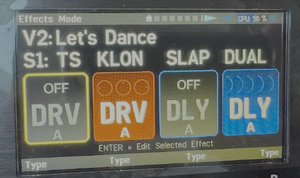
Tip: If you don't need scene names, use the available space to indicate the specific effect types instead. Insert spaces to visually align them.
Levels
The AM4 has two stages that affect the overall volume.
- Internal levels
- These operate within presets and include: Input Level, Amp Level, Scene Levels, Preset Level.
FRACTAL AUDIO QUOTES
[26] INTERNAL LEVELS are determined by the combined amp settings, effect settings, and level settings within your presets. For most people, the AMP LEVEL control is typically used to adjust this. The Internal Levels Meter—found on the Main Levels of the home menu page and repeated on the 2nd to last page of the Amp Edit menu—shows a white line at 0 dB, the “sweet spot” where levels are strong but still have plenty of headroom. It’s fine to push slightly past 0 dB, but avoid hitting the ceiling. Higher internal levels can also make it easier to clip the analog outputs. Every block (including CAB, which you mention) has its own level control but you generally only need to adjust the amp unless you have a compressor after it.
- Analog output level
- This is controlled by the top-panel knob. Set it to the preferred but avoid overdriving the output stage or connected device(s). The Analog Levels meter shows how close you are to clipping, and an OUT CLIP warning will appear in the title bar across all pages if clipping occurs. The outputs operate at adjustable line level, not at fixed unity gain.
FRACTAL AUDIO QUOTES
[27] ANALOG LEVELS are controlled by the top-panel OUT LEVEL knob, which sets the volume of the analog outputs and headphones. Use it to set your preferred listening level, but avoid overdriving the output stage or your connected device(s). The Analog Levels meter on the Main Levels page shows how close you are to clipping, and an OUT CLIP warning will also appear in the title bar across all pages if clipping occurs. If this happens, lower the knob or reduce levels inside your presets. Of course, your speakers, mixers, or recording interface have their own volume or gain controls as well. These operate after the AM4 outputs, so you can keep the AM4 hot and adjust downstream, or vice versa. Start with your speaker volume at noon and the AM4 all the way down to get a feel for how loud things will be as you turn up the AM4.

AM4-Edit software editor
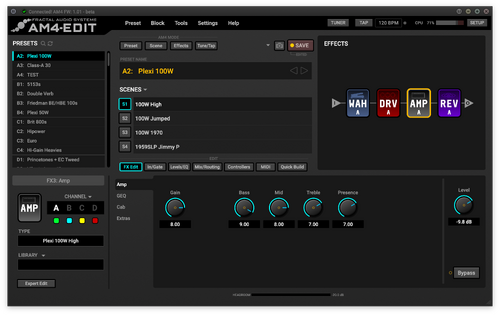
AM4-Edit is the editor for the AM4, with Fractal-Bot built-in.
You can download AM4-Edit, along with the Windows driver, firmware and factory presets updates, from the AM4 downloads page.
Onboard switches
The four foot switches have colored indicators, but no scribble strips.
The press and hold functions of the four switches work globally across all presets and modes.
Factory default is the so-called Gig Mode
, explained in the manual, that also provides two-switch combos.
In Custom Mode, the press & hold functions can be set per switch. This also works globally (across all presets). The two-switch combos are not carried over to Custom Mode, at this time.
Options are:
- Disabled
- Mode Select
- Preset Mode, Scene Mode, FX Mode, Tuner Model, Amp Mode
- Bank +1, Bank -1: when you change banks, the same preset number from the new bank is automatically loaded (e.g., if C3 is selected and you switch to Bank D, D3 will load)
- Preset +1, Preset -1
- Scene +1, Scene -1
- Channel Picker: this shows the 4-button “Channel Picker” for the corresponding effect slot
MIDI
The unit has 3.5 mm (1/8”) MIDI IN and OUT ports. Adapters are available from Fractal Audio.
The Boss BMIDI-5-35 cable has been tested and works with the AM4 to connect to 5-pin MIDI gear.
The AM4 supports:
- Sending and receiving Program Changes (PC)
- Sending and receiving Control Changes (CC)
- MIDI-over-USB
- MIDI clock (receive only, currently)
- Software MIDI Thru
- Syncing scenes with the VP4
A table in the manual translates MIDI Program Changes to AM4 presets.
The AM4 tempo does respond to MIDI Beat Clock. It does not send MIDI Clock.
See MIDI for more information.
Expression pedals and external switches
The unit supports two expression pedals and expression pedal connections (TRS, 10–100 kΩ max), or two single TS external switches (momentary or latching).
The unit does not provide FASLINK connections and can't connect to FC-6 and FC-12 foot controllers foot controllers.
Like the other modelers, you can make an expression pedal perform as a volume pedal as follows:
- Assign it to a level parameter in a block, particularly the Volume block, or
- Assign it to global Input or Output Volume, across all presets.
The AM4 also has a unique feature: Amp Block Out Volume. This lets you adjust the output volume of the amp with a pedal, without the need to put a Volume block between the amp and any time-based effects. It does not affect amp gain or tone.
External amp switching
The AM4 itself does not provide relays to switch amp channels, but it can connect through MIDI to a relay switcher to perform that duty.
Possible solutions include:
- MIDI Solutions Relay
- Suhr MicroMIDI Control
- Voodoo Lab Control Switcher
- Pirate MIDI CLiCK
- RJM Mini Amp Gizmo (no longer available from RJM but might be available used. The manual is currently available online.)
- EM
Sounds
Presets, scenes and channels
The unit has 104 presets, supports four scenes per preset and four channels per effect block.
The presets are organized into 26 banks, each identified by a letter from A to Z. Within each bank, there are four presets, numbered 1 through 4.
Each block has 4 channels. The AM doesn't support Global blocks. [28]
Switching between presets, scenes and channels is gapless.
AM4 presets and blocks are not compatible with Fractal Audio's other amp modelers, nor vice versa. Explanation
The latest factory presets are available on the AM4 downloads page. Here's the list from the manual:


Amp and cab modeling
The amp modeling is identical to the Axe-Fx III. [29]
FRACTAL AUDIO QUOTES
[30] The blocks are identical. The AM4 runs off the same code base as the Axe-Fx III.
The AM4 provides a single Amp block, with an integrated Cab section (instead of a separate Cab block).
Only when selecting the SPLIT output mode, the Cab section is repositioned at the end of the chain.
Some amp models have been consolidated.
Amp Mode lets you quickly access amp parameters and switch amp/cab channels, and provides an output boost.
A few amp models have been deprecated:
- Brit Pre
- old Vibrato Verb
- Legend 1
- Chieftain 2
- Dizzy V4 Blue
- Thordendal
Loading an amp model automatically selects an appropriate cab: Amp>DynaCab linking
. This can be disabled in SETUP. The Amp+DynaCab combos are described on the Amp models page.
To selectively keep Cab settings when changing the amp type, hold ENTER while turning SELECT, then release ENTER to apply the change. AM4-Edit, you can hold SHIFT while selecting a new amp from the list to achieve the same result.
DynaCabs are included. Legacy factory cabs are not included. IRs can also be imported (256 slots), supporting UltraRes. The Cab Blend parameter replaces individual Cab Level controls.
Similar to the FM3, the Amp block does not support Input Dynamics and Bias Tremolo.
FRACTAL AUDIO QUOTES
[31] The list is trimmed down a bit but the essential stuff is in there.
Other effects
Available effects on the AM4, other than Amp/Cab:
- Chorus block
- Compressor block
- Delay block
- Drive block
- Enhancer block
- Filter block
- Flanger block
- Gate/Expander block
- GEQ block
- PEQ block
- Phaser block
- Reverb block
- Rotary block
- Tremolo/Panner block
- Volume/Panner block
- Wah block

The AM4 does NOT have these blocks: Formant, IR Capture, IR Player, Megatap Delay, Multitap Delay, Pitch, Plex Delay, Resonator, Ring Modulator, Synth, Tone Match, Vocoder.
FRACTAL AUDIO QUOTES
[32] The choice of effects was so that you couldn't overload the processor. Running a Reverb and a Plex plus the Amp block would exceed the processor's bandwidth. Engineering is all about tradeoffs. It's a constant juggle between price, size, features, power consumption and performance. As such, no product will be perfect for everybody. In an ideal world DSPs would use no power and have infinite clock speeds. Until then products will have to make compromises. At some point we can revisit the effects inventory.
At the input of each preset there is a Noise gate, and a 10-band EQ at the output. Both are always on
.
Several effects are part of other effects: [33]
- Amp block: input boost (several types), output boost, input PEQ, output or pre-power GEQ, compression
- Cab block: part of the amp block, mic preamp, room reverb
- Delay block: can do chorus and delay at the same time
- Reverb: includes simple delay in some types, pitch shifting for shimmer
Like the VP4, there are some differences with the larger modelers:
- Additional tweaked types, such as Vibrato and single voice Pitch types
- Tweaked MIX Law for time-based effects
- Mode switch in some Drive types instead of multiple types (e.g. Timothy)
- Some renamed types
3 of the 4 blocks can be routed in parallel instead of series.
The blocks support Fractal Audio's system of modifiers and controllers.
FRACTAL AUDIO QUOTES
[34] The mix law in many blocks is different to suit the "all effects before the amp" crowd better.
[35] The sweetened mix law places a wider range of knob motion in the portion of the curve where the delay is quieter.
This replicates the way pedals that are designed for use in front of an amp work because the amp's compression reduces the difference between the quiet echoes and the louder dry signal.
[36] For time-based effects, the AM4—being based on the VP4—uses the a mix law based on that of the Delay block in the Axe-Fx. The dry signal remains constant for mix values from 0–50%, with only the wet signal increasing over that range. So you don't even need to worry about dry levels changing when you tweak the mix on time based effects.
Tips and tricks
So the AM4 has four block slots; Perhaps it's better to think of those as a maximum of four switches, because there's so much functionality available beyond the four slots.
This section provides tips and tricks to make the most of the features and functionality of the AM4, within and outside the four slots.
Don't confuse this with saving CPU. See CPU usage for more information.
Tips and tricks:
- Get 16 sounds from the four blocks in a preset using Channels.
- Add compression within the Amp block.
- Add drive pedals (input boosts) within the Amp block.
- Every preset AND Amp block provide EQ-ing tools.
- There's a noise gate included in every preset.
- There's a solo boost option within the Amp block, per scene or available as a switch.
- Add room ambience within the Cab block.
- Simulate channels strips and mic preamps within the Amp block.
- Turn the Chorus block into a Flanger or a micro pitch.
- Turn the Flanger block into a Chorus.
- Turn the Delay block into a Flanger or Chorus, or into Reverb.
- Use the Dual Delay type for delay AND chorus. Watch the video below.
- Turn the Reverb block into a Delay.
- Turn the Volume/Panner block into a Tremolo.
- Get Shimmer from the Reverb block.
- Use Modifiers and controllers for even more control over parameters and functions.
- Assign an expression pedal to Amp Block Out Volume, to let you adjust the, duh, output volume of the amp with the pedal, without affecting delay/reverb trails, amp gain or tone.
Watch the videos below for examples.
AM4 with VP4
There are various ways to combine the AM4 and VP4 into a powerful floor-based amp modeling and multi-effects setup.
Digital
- VP4 > AM4
- Connect SPDIF Out on the VP4 to SPDIF In on the AM4.
- AM4 > VP4
- Connect SPDIF Out on the AM4 to SPDIF In on the VP4.
Analog
- VP4 Out > AM4 In
- Connect the output jack on the VP4 to the instrument input on the AM4. Mono.
- AM4 Out > VP4 In
- Connect the output jack(s) on the AM4 to the analog input(s) on the VP4.
- AM4 >< insert VP4
- Put the VP4 in the insert loop of the AM4, using an insert cable.
- VP4 >< 4CM AM4
- Set to the VP4 to 4CM, and put the AM4 in loop of the VP4. Mono.
- VP4 >< 4CM AM4 through inserts
- This particular setup makes 4CM possible with the AM4, AND enables allows hearing the sound from both devices through the headphones port on the AM4. Guitar goes into VP4 Input Left Pre. VP4 Out Left Pre goes into the instrument input on the AM4. VP4 Out Right Post goes into the insert return on the AM4. AM4 Insert Send goes to Input Right Post on the VP4. Resulting signal will be mono.
Use a special cable if you need signal at both outputs of the AM4, see this picture:

Notes:
- Use MIDI Program Changes or "Scene Sync" to synchronize switching on both devices.
- You probably don't need to use the noise gate on the 2nd device. Instead of turning that off per preset, you can do it globally in Setup > Global Settings.
Videos
More videos:
