This is the wiki for products made by Fractal Audio Systems. Maintained by members of the community.
Difference between revisions of "Wah block"
m (moved Wah (block) to Wah block) |
|||
| (425 intermediate revisions by 4 users not shown) | |||
| Line 1: | Line 1: | ||
| − | + | __TOC__ | |
| − | = | + | [[image:EV-1 rear.png|link=|200px]] |
| − | + | =Available on which products= | |
| − | |||
| − | |||
| − | |||
| − | |||
| − | + | *''' Axe-Fx III''': 2 blocks | |
| + | *''' FM9''': 2 blocks | ||
| + | *''' FM3''': 2 blocks | ||
| + | *''' Axe-Fx II''': 2 blocks | ||
| + | * '''AX8''': 1 block | ||
| + | * '''FX8''': 2 blocks | ||
| − | == | + | =Channels or X/Y= |
| − | |||
| − | |||
| − | |||
| − | |||
| − | |||
| − | |||
| − | |||
| − | |||
| − | |||
| − | + | *''' Axe-Fx III''' and '''FM9''' and '''MF3''': 4 channels | |
| − | * | + | * '''Axe-Fx II''': X/Y |
| − | * | + | * '''AX8''': X/Y |
| + | * '''FX8''': X/Y | ||
| − | + | =Wah types= | |
| − | |||
| − | |||
| − | + | * '''Clyde''' – based on an original Vox Clyde McCoy wah. | |
| − | * | + | * '''Color-Tone''' – Based on a Sola Colorsound wah. |
| + | * '''Cry Babe''' – Based on a Dunlop Cry Baby. | ||
| + | * '''FAS Wah''' – Fractal Audio's wah model. | ||
| + | * '''Funk Wah''' – Based on the sound from the “Shaft” movie. | ||
| + | * '''Mortal''' – Based on a Morley wah/volume pedal. | ||
| + | * '''Paragon''' – Based on a Tycobrahe Parapedal. | ||
| + | * '''VX485''' – Based on a Vox V845. | ||
| + | * '''VX846''' – Based on a Vox V846-HW handwired wah. | ||
| − | + | Other Wah pedals can be emulated by copying data from the manufacturer's data: | |
| − | * | + | * [http://forum.fractalaudio.com/threads/petrucci-and-cantrell-wah.128421/#post-1525516 Dunlop's Petrucci and Cantrell wah pedals] |
| − | [ | + | * [http://forum.fractalaudio.com/threads/anyone-dialed-in-a-good-budda-bud-wah-block.152157/ Budda BudWah] |
| − | + | * [https://www.sweetwater.com/feature/dunlop/wah-pedals/index.php Sweetwater's Dunlop Wah comparison chart] | |
| − | * | ||
| − | == | + | =Factory presets= |
| − | |||
| − | + | Many [[Factory presets]] have a Wah block. | |
| − | |||
| − | [[category: | + | =Wah block position on the grid= |
| − | [[category: | + | |
| + | Just like actual Wah pedals, the Wah block is usually placed ''before'' the amp. | ||
| + | |||
| + | Unless you want to sound like Tom Morello, in which case it should be placed ''after'' the Amp block. | ||
| + | |||
| + | =Set up an expression pedal= | ||
| + | |||
| + | You need an expression pedal. Alway connect the expression pedal with a TRS-TRS cable ("stereo jack"). | ||
| + | |||
| + | Read this: [[Expression pedals and external switches]]. | ||
| + | |||
| + | The [[Owners Manuals]] also have a tutorial on setting up a Wah pedal in the Modifier section. | ||
| + | |||
| + | Firmware 21.02 for the Axe-Fx III and later: the Wah engages and bypasses with a gentle fade instead of rapid on/off. | ||
| + | |||
| + | =Calibrate the pedal= | ||
| + | |||
| + | Always calibrate the pedal on the hardware. Make sure you're using the correct menu for that: | ||
| + | |||
| + | * if the pedal is connected directly to the Axe-Fx, FM3, or FM9: go to Pedal in the [[I/O menu]]. | ||
| + | * if the pedal is connected to an FC controller: go to FC Controllers in the [[Setup menu]]. | ||
| + | * if the pedal is connected to a MIDI controller: use the calibration function on that controller. | ||
| + | |||
| + | =Auto-engage= | ||
| + | |||
| + | Similar to an optical Wah pedal, you can engage the Wah block automatically when moving the pedal. This is especially handy when using a spring-loaded pedal. To accomplish this, set [[Auto-Engage]] in the CONTROL parameter's modifier menu in the Wah block to either a speed- or position-controlled setting. | ||
| + | |||
| + | To turn off the Wah at toe down position, instead of heel-down: set OFF VALUE to 95%. | ||
| + | |||
| + | =Parameters= | ||
| + | |||
| + | ==Control and Taper== | ||
| + | |||
| + | The Control parameter controls the sweep. The Taper parameter selects the curve of the sweep. The taper number (5, 10, 15, 20, 30) is the percentage at the halfway point. I.e. Log 20A means that the resistance is 20% at the halfway point in the travel. So if you put the knob at noon, it would be 20% of maximum. | ||
| + | |||
| + | ==Maximum Frequency== | ||
| + | |||
| + | Lowering this allows a high gain Wah tone to cut better through the mix. | ||
| + | |||
| + | ==Inductor Bias (Coil Bias)== | ||
| + | |||
| + | Adjust the DC offset of the virtual inductor. | ||
| + | |||
| + | <blockquote>"Over time the inductors build up some slight permanent magnetism due to finite DC current through them. This causes asymmetric distortion." [http://forum.fractalaudio.com/threads/axe-fx-ii-quantum-rev-6-00-firmware-released.121149/page-12#post-1442627] </blockquote> | ||
| + | |||
| + | ==Fat== | ||
| + | |||
| + | <blockquote>"FAT is actually a mix control. It adds dry signal so you can't ever get 100% dry. At max FAT it's 50/50." </blockquote> | ||
| + | |||
| + | ==Q Tracking== | ||
| + | |||
| + | <blockquote>"Tracking controls how much the Q changes with the Control knob. The Q in a wah is not constant. The amount of Q change varies from brand to brand and model to model. It even varies between identical models due to component tolerances." [http://forum.fractalaudio.com/threads/small-tip-for-the-wah-block-the-tracking-parameter.79738/#post-969579] </blockquote> | ||
| + | |||
| + | ==Graphic EQ== | ||
| + | |||
| + | 8-band Graphic EQ. | ||
| + | |||
| + | ==Output Level== | ||
| + | |||
| + | When changing the Wah type, the output level is adjusted automatically because the output of the models has been matched to the original pedals. [http://forum.fractalaudio.com/threads/axe-fx-ii-quantum-rev-6-00-firmware-released.121149/page-11#post-1442565] | ||
| + | |||
| + | <blockquote>"A typical wah has a gain of around 16 dB but it's a bandpass (sort of) response. If your amp is set clean then the output of the amp block will increase by 16 dB when the wah is engaged. Most amps have a response that rises with frequency response. So if the output of the amp block without the wah engaged was, say, 12 dB below full-scale at the high frequencies, it will be 4 dB over full-scale when the wah is engaged." [http://forum.fractalaudio.com/threads/wah-clipping-on-cleans.122027/#post-1452980] </blockquote> | ||
| + | |||
| + | =Tips, tricks and troubleshooting= | ||
| + | |||
| + | ==Seek Wah== | ||
| + | |||
| + | The Seek Wah is a pedal by ZVEX, which uses a sequenced filter pattern. For an equivalent effect, assign the Sequencer controller to the Wah's CONTROL parameter. For a more pronounced effect, add a [[Formant block]], attached to the same controller. | ||
| + | |||
| + | Try this factory preset: S/HIP AHOY. | ||
| + | |||
| + | ==Auto Wah== | ||
| + | |||
| + | Read this: [[Filter block]]. | ||
| + | |||
| + | ==Fixed Wah== | ||
| + | |||
| + | Simulate a fixed Wah position (think "Money For Nothing" by Dire Straits) by setting the CONTROL parameter to a fixed value. Try this factory preset: MONEY FOR SOMETHING. | ||
| + | |||
| + | ==Slow sweep== | ||
| + | |||
| + | Attach the LFO internal controller to the Control parameter in the Wah block to create a slow evolving filter effect. Try this factory preset: VELVET SUN. | ||
| + | |||
| + | ==Prevent the thump== | ||
| + | |||
| + | Auto Input Impedance can can cause a low-frequency thump when engaging the Wah. Read this: [[Input impedance]]. | ||
| + | |||
| + | ==Alternative to Auto-Engage== | ||
| + | |||
| + | For an alternative approach to [[Auto-Engage]], load Devin Townsend's preset that's part of [https://www.fractalaudio.com/gift-of-tone/ Fractal Audio's Gift of Tone series] or the HEVY DEVY factory preset. | ||
| + | |||
| + | ==Using an pedal for multiple tasks== | ||
| + | |||
| + | If you want the expression pedal to perform more tasks than a Wah only, read this: [[Expression pedals and external switches]]. | ||
| + | |||
| + | =Videos= | ||
| + | |||
| + | [[video:Lon-Wah-Epic]] | ||
| + | [[video:Leon-Wah-Backwards]] | ||
| + | [[video:Leon-Wah-Petrucci]] | ||
| + | [[video:Leon-AutoWah]] | ||
| + | [[video:Leon-Wah-Devin]] | ||
| + | [[video:Leon-Wah-Deep]] | ||
| + | [[video:Leon-ExpPedal-Functions]] | ||
| + | [[video:Lance-Wah]] | ||
| + | [[video:Burgs-Paragon]] | ||
| + | [[video:Leon-Paragon]] | ||
| + | [[video:PaulDavids-Wah]] | ||
| + | [[video:Cooper-Wah-Volume]] | ||
| + | |||
| + | [[category:Axe-Fx2]] | ||
| + | [[category:FM3]] | ||
| + | [[category:FM9]] | ||
| + | [[category:Axe-Fx3]] | ||
| + | [[category:FX8]] | ||
| + | [[category:AX8]] | ||
| + | [[category:Sounds]] | ||
| + | [[category:All]] | ||
Revision as of 11:13, 22 May 2023
Contents
Available on which products
- Axe-Fx III: 2 blocks
- FM9: 2 blocks
- FM3: 2 blocks
- Axe-Fx II: 2 blocks
- AX8: 1 block
- FX8: 2 blocks
Channels or X/Y
- Axe-Fx III and FM9 and MF3: 4 channels
- Axe-Fx II: X/Y
- AX8: X/Y
- FX8: X/Y
Wah types
- Clyde – based on an original Vox Clyde McCoy wah.
- Color-Tone – Based on a Sola Colorsound wah.
- Cry Babe – Based on a Dunlop Cry Baby.
- FAS Wah – Fractal Audio's wah model.
- Funk Wah – Based on the sound from the “Shaft” movie.
- Mortal – Based on a Morley wah/volume pedal.
- Paragon – Based on a Tycobrahe Parapedal.
- VX485 – Based on a Vox V845.
- VX846 – Based on a Vox V846-HW handwired wah.
Other Wah pedals can be emulated by copying data from the manufacturer's data:
Factory presets
Many Factory presets have a Wah block.
Wah block position on the grid
Just like actual Wah pedals, the Wah block is usually placed before the amp.
Unless you want to sound like Tom Morello, in which case it should be placed after the Amp block.
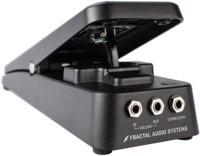
Set up an expression pedal
You need an expression pedal. Alway connect the expression pedal with a TRS-TRS cable ("stereo jack").
Read this: Expression pedals and external switches.
The Owners Manuals also have a tutorial on setting up a Wah pedal in the Modifier section.
Firmware 21.02 for the Axe-Fx III and later: the Wah engages and bypasses with a gentle fade instead of rapid on/off.
Calibrate the pedal
Always calibrate the pedal on the hardware. Make sure you're using the correct menu for that:
- if the pedal is connected directly to the Axe-Fx, FM3, or FM9: go to Pedal in the I/O menu.
- if the pedal is connected to an FC controller: go to FC Controllers in the Setup menu.
- if the pedal is connected to a MIDI controller: use the calibration function on that controller.
Auto-engage
Similar to an optical Wah pedal, you can engage the Wah block automatically when moving the pedal. This is especially handy when using a spring-loaded pedal. To accomplish this, set Auto-Engage in the CONTROL parameter's modifier menu in the Wah block to either a speed- or position-controlled setting.
To turn off the Wah at toe down position, instead of heel-down: set OFF VALUE to 95%.
Parameters
Control and Taper
The Control parameter controls the sweep. The Taper parameter selects the curve of the sweep. The taper number (5, 10, 15, 20, 30) is the percentage at the halfway point. I.e. Log 20A means that the resistance is 20% at the halfway point in the travel. So if you put the knob at noon, it would be 20% of maximum.
Maximum Frequency
Lowering this allows a high gain Wah tone to cut better through the mix.
Inductor Bias (Coil Bias)
Adjust the DC offset of the virtual inductor.
"Over time the inductors build up some slight permanent magnetism due to finite DC current through them. This causes asymmetric distortion." [1]
Fat
"FAT is actually a mix control. It adds dry signal so you can't ever get 100% dry. At max FAT it's 50/50."
Q Tracking
"Tracking controls how much the Q changes with the Control knob. The Q in a wah is not constant. The amount of Q change varies from brand to brand and model to model. It even varies between identical models due to component tolerances." [2]
Graphic EQ
8-band Graphic EQ.
Output Level
When changing the Wah type, the output level is adjusted automatically because the output of the models has been matched to the original pedals. [3]
"A typical wah has a gain of around 16 dB but it's a bandpass (sort of) response. If your amp is set clean then the output of the amp block will increase by 16 dB when the wah is engaged. Most amps have a response that rises with frequency response. So if the output of the amp block without the wah engaged was, say, 12 dB below full-scale at the high frequencies, it will be 4 dB over full-scale when the wah is engaged." [4]
Tips, tricks and troubleshooting
Seek Wah
The Seek Wah is a pedal by ZVEX, which uses a sequenced filter pattern. For an equivalent effect, assign the Sequencer controller to the Wah's CONTROL parameter. For a more pronounced effect, add a Formant block, attached to the same controller.
Try this factory preset: S/HIP AHOY.
Auto Wah
Read this: Filter block.
Fixed Wah
Simulate a fixed Wah position (think "Money For Nothing" by Dire Straits) by setting the CONTROL parameter to a fixed value. Try this factory preset: MONEY FOR SOMETHING.
Slow sweep
Attach the LFO internal controller to the Control parameter in the Wah block to create a slow evolving filter effect. Try this factory preset: VELVET SUN.
Prevent the thump
Auto Input Impedance can can cause a low-frequency thump when engaging the Wah. Read this: Input impedance.
Alternative to Auto-Engage
For an alternative approach to Auto-Engage, load Devin Townsend's preset that's part of Fractal Audio's Gift of Tone series or the HEVY DEVY factory preset.
Using an pedal for multiple tasks
If you want the expression pedal to perform more tasks than a Wah only, read this: Expression pedals and external switches.
