This is the wiki for products made by Fractal Audio Systems, maintained by members of the community.
Difference between revisions of "Multiband Compressor block"
| Line 34: | Line 34: | ||
Or just check factory preset: Multicomp Plexi. | Or just check factory preset: Multicomp Plexi. | ||
| + | |||
| + | |||
| + | [[category:Axe-Fx2]] | ||
| + | [[category:Axe-Fx3]] | ||
| + | [[category:FM3]] | ||
| + | [[category:FM9]] | ||
| + | [[category:AX8]] | ||
| + | [[category:Sounds]] | ||
| + | [[category:All]] | ||
Revision as of 08:38, 25 March 2022
Contents
 ]]
]]
Available on which products
- Axe-Fx III: 2 blocks
- FM3: 1 block
- FM9: 2 blocks
- Axe-Fx II: 2 blocks
- AX8: no
- FX8: no
Channels or X/Y switching
- Axe-Fx III and FM9 and FM3: 2 channels
- Axe-Fx II: no
What is a Multiband Compressor
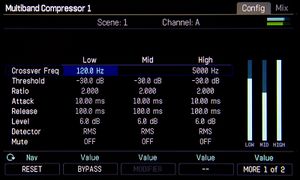
A multiband compressor (MBC) consists of multiple compressors working in parallel, each operating on a separate band of frequencies. Fractal Audio's Multiband Compressor blocks contains 3 compressors. These compressors work independently, so "pumping" in one band does not affect the others. An MBC is often used as a mastering tool.
More information:
Leon Todd's tutorial on applying Andy Sneap's multicompression trick to improve palm muting
Configure the Multiband Compressor
In-depth programming of the Multiband Compressor is possible, but even at default settings (placed after Amp/Cab) it's performing fine.
Leon Todd shows how to dial in the MBC for high-gain tones
Or just check factory preset: Multicomp Plexi.
